![[Top]](../images/home.jpg)

![[Contents]](../images/contents.jpg)
![[Prev]](../images/previous.jpg)
![[Next]](../images/next.jpg)
![[Last]](../images/index.jpg)


Numeric A B C D E F G H I L M N O P Q R S T U V W Y
LAN-Modem
Description: A profile created by the system for each installed modem card.
Usage: Use the Read and List commands to make LAN-Modem the working profile and list its contents. For example:
admin> read lan {1 6 0}

LAN-MODEM/{ shelf-1 slot-6 0 } read
admin> listYou can then use the Set command to modify the settings in the profile. To close the profile and save your changes:
physical-address*={ shelf-1 slot-6 0 }
modem-disable-mode=[ enable enable enable enable enable enable +
admin> writeDependencies: The LAN-Modem profile exists until a different slot card is detected in the slot. Removing or downing a modem card does not delete the profile or change its contents.
LAN-MODEM/{ shelf-1 slot-6 0 } written
See Also: Modem-Disable-Mode, Physical-Address
Layer3-End
Description: Specifies CCITT Layer 3, which must be set to its default when a DPNSS or
DASS2 switch type is in use.
Usage: Specify one of the following values:
Location:
E1 {shelf-N slot-N N} > Line-Interface
See Also: Line-Interface, Switch-Type
Left-Status
Description: Specifies the default content of the left side of the status window.
Usage: Specify one of the following values:
Location:
User name
See Also: Bottom-Status, Default-Status, Top-Status
Len
Description: Specifies the number of bytes to test in a frame. Starting at the specified Offset,
the MAX TNT compares the contents of the bytes to the generic filter's Value setting.
Usage: Specify a number from 0 to 8. The default is 0 (zero), which specifies that the MAX TNT does not compare packet contents and that all packets match the filter.
Example: offset=2
len=8
more=no
comp-neq=no
mask=0f:ff:ff:ff:00:00:00:f0:00:00:00:00
value=07:fe:45:70:00:00:00:90:00:00:00:00
In this Gen-Filter specification, the filter applies the mask to the eight bytes following the two-byte offset.
Filter filter-name > Input-Filters > Gen-Filter,
See Also: Gen-Filter, Input-Filters, Output-Filters
Filter filter-name > Output-Filters > Gen-Filter
Line-Config
Description: A subprofile containing line configuration options for a Serial WAN, RADSL,
or SDSL card.
Usage: With ADSL-Cap, SDSL, or SWAN as the working profile, list the Line-Config subprofile. For example:
admin> list lineYou can then use the Set command to modify the settings in the subprofile. To close the subprofile and return to a higher context in the working profile:
trunk-group=0
nailed-group=2
activation=static
call-route-info={ any-shelf any-slot 0 }
max-down-stream-rate=2560000
admin> list ..Location:
ADSL-Cap {shelf-N slot-N N}, SDSL {shelf-N slot-N N},
SWAN {shelf-N slot-N N}
See Also: Activation, Call-Route-Info, Max-Down-Stream-Rate, Nailed-Group, Trunk-Group
Line-Interface
Description: A subprofile containing T1 PRI, E1 PRI, or ISDN BRI line configuration
options.
Usage: With a T1 profile as the working profile, list the Line-Interface subprofile. For example:
admin> list lineWith an E1 profile as the working profile, list the Line-Interface subprofile. For example:
enabled=no
frame-type=d4
encoding=ami
clock-source=eligible
clock-priority=middle-priority
signaling-mode=inband
robbed-bit-mode=wink-start
default-call-type=digital
switch-type=att-pri
nfas-id=0
call-by-call=0
data-sense=normal
idle-mode=flag-idle
fdl=none
front-end-type=dsx
DSX-line-length=1-133
CSU-build-out=0-db
channel-config={ { switched-channel 9 "" { any-shelf any-slot 0 } 0 +
maintenance-state=no
sendDisc-val=0
hunt-grp-phone-number-1=""
hunt-grp-phone-number-2=""
hunt-grp-phone-number-3=""
admin> list lineWith an IDSL profile as the working profile, list the Line-Config subprofile:
enabled=yes
frame-type=g703
clock-source=eligible
clock-priority=middle-priority
signaling-mode=isdn
switch-type=net5-pri
front-end-type=short-haul
channel-config=[ { unused-channel 9 "" { any-shelf any-slot 0 } 0 } +
layer3-end=x-side
nl-value=64
loop-avoidance=7
number-complete=end-of-pulsing
group-b-answer-signal=signal-b-6
group-b-busy-signal=signal-b-3
group-ii-signal=signal-ii-2
answer-delay=200
caller-id=no-caller-id
admin> list lineYou can then use the Set command to modify the settings in the subprofile. To close the subprofile and return to a higher context in the working profile:
line-enabled=yes
answer-number-1=""
answer-number-2=""
admin> list ..Location:
E1 {shelf-N slot-N N}, IDSL {shelf-N slot-N N}, T1 {shelf-N slot-N N}
See Also: Answer-N (N=1-2), Answer-Delay, Call-By-Call, Caller-ID, Channel-Config,
Clock-Priority, Clock-Source, CSU-Build-Out, Data-Sense, Default-Call-Type,
DSX-Line-Length, Enabled, Encoding, FDL, Frame-Type, Front-End-Type, Group-II-Signal,
Group-B-Answer-Signal, Group-B-Busy Signal, Hunt-Grp-Phone-Number-N, Idle-Mode,
Layer3-End, Loop-Avoidance, Maintenance-State, NFAS-ID, NL-Value, Number-Complete,
Robbed-Bit-Mode, SendDisc-Val, Signaling-Mode, Switch-Type
Line-Length
Description: Specifies the length of the Rx and Tx lines to a DSX-3 Cross Connect.
Usage: Specify either of the following values:
Location:
T3 {shelf-N slot-N N}
See Also: Enabled, Frame-Type, Name, Physical-Address,
Line-Quality
Description: Indicates the line quality (in decibels). For an SDSL interface, a reading of -5dB
or better is required for reliable data transfer.
Usage: The Line-Quality setting is read only.
Location:
ADSL-Cap-Statistics {shelf-N slot-N N}, SDSL-Statistics {shelf-N slot-N N}
See Also: Connection-SQ, Far-End-dB-Attenuation, HDLC-RX-CRC-Error-Cnt,
Line-Up-Timer, Physical-Address, RS-Corrected-Errors, RS-Errors, RX-Attenuation, RX-Signal-Present
, Self-Test, Transmit-Power, Up-Down-Cntr
Line-State
Description: Reports the state of a T1 PRI, DS3, ISDN BRI, RADSL, SDSL, or SWAN line.
Usage: The Line-State setting is read only. You cannot set Line-State directly. For a T1 PRI line, the state can have one of the following values:
For a RADSL line, Line-State can have one of the following values:
line-state=active
Location:
ADSL-Cap-Stat {shelf-N slot-N N}, IDSL-Stat {shelf-N slot-N N},
See Also: Channel-State, DS2-State
SDSL-Stat {shelf-N slot-N N}, SWAN-Stat {shelf-N slot-N N}, T1-Stat {shelf-N slot-N N},
T3-Stat {shelf-N slot-N N}
Line-Up-Timer
Description: Indicates the length of time the line has been in the up state.
Usage: The Line-Up-Timer value is read only. It has the following format:
{hh mm ss}
where hh is the number of hours, mm is the number of minutes, and ss is the number of secondsLocation:
ADSL-Cap-Statistics {shelf-N slot-N N}, SDSL-Statistics {shelf-N slot-N N}
See Also: Connection-SQ, Far-End-dB-Attenuation, HDLC-RX-CRC-Error-Cnt, Physical-Address
, RS-Corrected-Errors, RS-Errors, RX-Attenuation, RX-Signal-Present, Self-Test,
Transmit-Power, Up-Down-Cntr
Link-Compression
Description: Specifies the link-compression method for a PPP, MP, and MP+ call.
Usage: Specify one of the following values:
Dependencies: Only PPP, MP, and MP+ links support Link-Compression. Both sides of the connection must specify the same type of link compression. Otherwise, your setting has no effect.
Location:
Answer-Defaults > PPP-Answer, Connection station > PPP-Options
See Also: PPP-Answer, PPP-Options, VJ-Header-Prediction
Link-Mgmt
Description: Specifies the link management protocol to use between the MAX TNT and the
Frame Relay switch. The Frame Relay administrator or service provider can tell you which
value to use.
Usage: Specify one of the following values:
Location:
Frame-Relay fr-name
See Also: DCEN392-Val, DCEN393-Val, FR-Name, Link-Type, N391-Val, N392-Val,
N393-Val, T391-Val, T392-Val
Link-State
Description: Indicates the physical state of the LAN interface.
Usage: The Link-State setting can be Up, Down, or Unknown. The value can only be set by the Ethernet driver.
Ether-Info {shelf-N slot-N N}
See Also: Interface-Address, Link-State-Enabled, MAC-Address
Link-State-Enabled
Description: Specifies whether the value of Link-State affects the IP routing tables.
Usage: Specify Yes or No. The default is No.
Location:
Ethernet {shelf-N slot-N N}
See Also: Link-State
Link-Type
Description: Specifies the kind of logical interface between the MAX TNT and the Frame
Relay network on the data link:
Location:
Frame-Relay fr-name
See Also: DCEN392-Val, DCEN393-Val, N391-Val, N392-Val, N393-Val, T391-Val,
T392-Val
Loadname
Description: Indicates the name of the software load that was running on a slot that failed.
Usage: The Loadname setting is read only.
Example: loadname=load1
Location:
Error
See Also: Index, IP-Address, IS-Post, Shelf, Slot, Stack-Trace, Type, User-Profile, Version
Local-Address
Description: Specifies an IP address for the local side of a numbered-interface connection.
Usage: Specify an IP address in dotted decimal notation. Separate the optional subnet mask from the address by entering a forward slash. The address must be unique to the connection. You can assign a fake IP address or an IP address from one of the local subnets. The MAX TNT accepts IP packets destined for the specified address and treats them as destined for the system itself. The packets might arrive on any interface, and the destination numbered interface need not be in the active state. The default is 0.0.0.0, which indicates an unnumbered interface.
Example: set local-address=10.2.3.4/24
Dependencies: The Local-Address value cannot be an address assigned in an IP-Interface profile to one of the MAX TNT unit's physical LAN interfaces, nor can it be the IP address of the shelf-controller Ethernet port.
Location:
Connection station > IP-Options
See Also: IP-Options, Remote-Address
Local-Echo
Description: Allows you to configure local-echo mode for a terminal-server session.
Local-echo mode is a line-by-line mode. The line appears as the user types it, but is not transmitted until the user enters a carriage return. If local echo is enabled, the line transmitted is echoed on the local MAX TNT terminal screen.
Dependencies: If terminal services are disabled, Local-Echo does not apply. A terminal-server
user can override the Local Echo setting from the command line by using the -e
option of the Telnet command.
Location:
Terminal-Server > Terminal-Mode-Configuration > Telnet-Options
See Also: Telnet-Options, Terminal-Mode-Configuration
Local-Profiles-First
Description: Specifies whether the MAX TNT should attempt local authentication before
remote external authentication.
Usage: Specify one of the following settings:
Dependencies: Consider the following:
External-Auth
See Also: Auth-Timeout, Auth-Type
Location
Description: Specifies the physical location of the MAX TNT. An SNMP manager can both
read and set the Location value.
Usage: Specify text describing where the MAX TNT is located. You can enter up to 80 characters. The default is null.
Example: set location=building 64
Location:
SNMP
See Also: Contact
Log
Description: A profile that specifies system-wide event-logging settings. System-wide event
logging includes the MAX TNT log buffer accessed by the Log command, and any Syslog host
designated by the Log profile. For information about the Log command, see Log.
Usage: Use the Read and List commands to make Log the working profile and list its contents. For example:
admin> read log
LOG read
admin> listYou can then use the Set command to modify the settings in the profile. To close the profile and save your changes:
save-level=info
save-number=100
call-info=none
syslog-enabled=no
host=0.0.0.0
port=514
facility=local0
syslog-format=tnt
admin> writeSee Also: Facility, Host, Save-Level, Save-Number, Syslog-Enabled, Syslog-Format
LOG written
Log-Display-Level
Description: Specifies the lowest level of the log messages that the MAX TNT displays to a
logged-in user.
Usage: Specify one of the following settings:
Example: set log-display-level=debug
Dependencies: Do not confuse Log-Display-Level with Save-Level in the Log profile. Save-Level determines which messages are displayed in the event-log status window.
Location:
User name
See Also: Log, Save-Level
Login-Prompt
Description: Specifies the string that acts as a prompt for a user name in the terminal-server
interface.
Description: If Prompt-Format=No, you can specify up to 15 characters, not including a newline or tab character.
Welcome to\n\t\\Ascend Remote Server\\\nEnter your user name:The terminal server displays the following text as the login prompt:
Welcome toRegardless of the Prompt-Format setting, the default setting for Login-Prompt is
\Ascend Remote Server\
Enter your user name:
Login:.Example: set login-prompt=Login Name:
Dependencies: If terminal services are disabled, Login-Prompt does not apply.
Location:
Terminal-Server > Terminal-Mode-Configuration
See Also: Password-Prompt, Prompt, Prompt-Format, Terminal-Mode-Configuration,
Third-Login-Prompt, Third-Prompt-Sequence
Login-Timeout
Description: Specifies the number of seconds a user can wait to log into the terminal server.
When a user attempts to log into the terminal server in terminal mode, a login prompt appears.
If the user does not proceed any further than the login prompt within the number of seconds
you specify, the login times out.
Usage: Specify a number between 0 and 300. The default is 300. If you set Login-Timeout to 0 (zero), the login never times out.
Example: set terminal login-timeout=60
Location:
Terminal-Server > Terminal-Mode-Configuration
See Also: Password-Prompt, Prompt, Prompt-Format, Terminal-Mode-Configuration,
Third-Login-Prompt, Third-Prompt-Sequence
Loop-Avoidance
Description: Specifies the number of transit devices through which the MAX TNT may route
a call.
Usage: Specify an integer from 1 to 26. The default is 7.
Example: set loop-avoidance=7
Location:
E1 {shelf-N slot-N N} > Line-Interface
See Also: Line-Interface, NL-Value
Loss-Of-Carrier
Description: Indicates a loss of the carrier signal on a T1 line.
Usage: The Loss-Of-Carrier setting is read only. True indicates a loss of carrier. False indicates that the carrier is maintaining a connection.
Location:
T1-Stat {shelf-N slot-N N}
See Also: AIS-Receive, BER-Receive, Carrier-Established, Loss-Of-Sync, Yellow-Receive
Loss-Of-Sync
Description: Indicates whether the T1 line has lost synchronization.
Usage: The Loss-Of-Sync setting is read only. True indicates that synchronization has been lost. False indicates that synchronization is intact.
Location:
T1-Stat {shelf-N slot-N N}
See Also: AIS-Receive, BER-Receive, Carrier-Established, Loss-Of-Carrier, Yellow-Receive
LQM
Description: Specifies whether the MAX TNT requests link-quality monitoring when
answering a PPP call. Link-quality monitoring counts the number of packets sent across the
link and periodically asks the remote end how many packets it has received. Discrepancies are
evidence of packet loss and indicate link-quality problems. Link-quality monitoring also
generates periodic link-quality reports, and the two ends of the link exchange the reports.
Usage: Specify Yes or No. The default is No.
Dependencies: The LQM value applies only to PPP links.
Location:
Answer-Defaults > PPP-Answer, Connection station > PPP-Options
See Also: LQM-Maximum-Period, LQM-Minimum-Period, PPP-Answer, PPP-Options
LQM-Maximum-Period
Description: Specifies the maximum period, in one-hundredths of a second, during which the
MAX TNT will accept and send link-quality monitoring packets when answering a PPP call.
Usage: Specify a number from 0 to 600. The default is 600.
Example: set lqm-maximum-period=300
Dependencies: If LQM=No, LQM-Maximum-Period does not apply.
Location:
Answer-Defaults > PPP-Answer, Connection station > PPP-Options
See Also: LQM, LQM-Minimum-Period, PPP-Answer, PPP-Options
LQM-Minimum-Period
Description: Specifies the minimum period, in one-hundredths of a second, during which the
MAX TNT will accept link-quality monitoring packets when answering a PPP call.
Usage: Specify a number from 0 to 600. The default is 600.
Example: set lqm-minimum-period=200
Dependencies: If LQM=No, LQM-Minimum-Period does not apply.
Location:
Answer-Defaults > PPP-Answer, Connection station > PPP-Options
See Also: LQM, LQM-Maximum-Period, PPP-Answer, PPP-Options
MAC-Address
Description: Specifies the Media Access Control (MAC) address of an Ethernet interface. An
Ethernet MAC address is a 12-digit hexadecimal number denoting the physical address
encoded in the controller.
Usage: In most cases, the MAC-Address value is obtained from the system. However, you can clone a profile by reading an existing one and changing its physical address.
Example: set mac-address=00:c0:6c:4e:ac:5a
Location:
Ether-Info {shelf-N slot-N N}
See Also: Interface-Address, Link-State
Maintenance-State
Description: Allows you to Busy Out or take Out Of Service (OOS) a T1 PRI line. Doing so
is known as quiescing the line to make it available for maintenance. Active calls on the line are
not torn down. When an active call disconnects, the MAX TNT takes the channel out of
service. When the entire line is out of service, it is available for maintenance.
Usage: Specify Yes or No. The default is No.
Dependencies: If the line's Signaling-Mode is not ISDN, Maintenance-State does not apply. When the MAX TNT reboots, all T1 PRI lines come up available for service.
Location:
T1 {shelf-N slot-N N} > Line-Interface
See Also: Line-Interface, Signaling-Mode
Major-Firmware-Ver
Description: Indicates the major firmware version of the RADSL or SDSL card.
Usage: The Major-Firmware-Ver setting is read only.
Location:
ADSL-Cap-Status {shelf-N slot-N N}, SDSL-Status {shelf-N slot-N N}
See Also: Dev-Line-State, Down-Stream-Constellation, Down-Stream-Operational-Baud,
Down-Stream-Rate, Hardware-Ver, IF-Group-Index, Minor-Firmware-Ver, Physical-Address,
Unit-Type, Up-Stream-Constellation, Up-Stream-Rate
Mask
Description: Specifies a 12-byte mask to apply to a generic filter's Value setting before
comparing the Value to the packet contents at the specified Offset. You can use the mask to
specify exactly which bits you want to compare.
After translating Mask and Value into binary format, the MAX TNT applies the mask to the specified value by performing a logical AND. The mask hides the bits that appear behind each binary 0 (zero) in the mask. A mask of all ones (FF:FF:FF:FF:FF:FF:FF:FF) masks no bits, so the full specified value must match the packet contents.
Example: offset=2
len=8
more=no
comp-neq=no
mask=0f:ff:ff:ff:00:00:00:f0:00:00:00:00
value=07:fe:45:70:00:00:00:90:00:00:00:00
Suppose you want to apply these Gen-Filter settings to the following packet contents:
2A 31 97 FE 45 70 12 22 33 99 B4 80 75The MAX TNT applies the mask as shown below, resulting in a value that matches the Value setting.
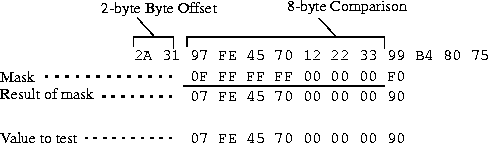
The packet matches the filter. Because Forward=No, the MAX TNT drops the packet. The byte comparison works as follows:
Filter filter-name > Input-Filters > Gen-Filter,

Filter filter-name > Output-Filters > Gen-Filter
See Also: Gen-Filter, Input-Filters, Output-Filters
Master-Shelf-Controller
Description: Specifies the number of the master shelf in a multishelf system.
Usage: Specify the number you set on the rotary switch. All shelves must agree upon the master shelf.
Example: set master-shelf-controller=1
Dependencies: If Shelf-Controller-Type=Master, Master-Shelf-Controller does not apply. You can set Master-Shelf-Controller for a slave shelf only.
Location:
System
See Also: Shelf-Controller-Type
Max-Baud-Rate
Description: Specifies the highest baud rate that digital modems should attempt to negotiate.
Typically, the digital modems start with the highest possible baud rate (33600) and negotiate
down to the rate accepted by the remote modem. You can adjust the maximum rate to bypass
some of the negotiation cycles, provided that no incoming calls use a baud rate higher than the
value you specify for Max-Baud-Rate.
Usage: Specify one of the following values:
33600-Max-Baud (the default)
31200-Max-Baud
28800-Max-Baud
26400-Max-Baud
2400-Max-Baud
21600-Max-Baud
19200-Max-Baud
16800-Max-Baud
14400-Max-Baud
12000-Max-Baud
9600-Max-Baud
7200-Max-Baud
4800-Max-Baud
2400-Max-Baud
Dependencies: If terminal services are disabled, Max-Baud-Rate does not apply.
Location:
Terminal-Server > Modem-Configuration
See Also: Down-Stream-Operational-Baud, Modem-Configuration
Max-Call-Duration
Description: Specifies the maximum number of minutes an incoming call can remain
connected. For a multichannel call, the maximum applies to each channel.
Usage: Specify a number from 0 to 1440. The MAX TNT checks the connection once per minute, so the actual time the call is connected is slightly longer than the time you set. The default is 0 (zero), which specifies that the MAX TNT does not set a limit on the duration of an incoming call.
Location:
Connection station > Session-Options
See Also: Session-Options
Max-Down-Stream-Rate
Description: Specifies the maximum down-stream rate supported by the ADSL-CAP card.
Specify one of the following settings to indicate the maximum down-stream rate the transceiver supports:
960000
1280000
1600000
1920000
2240000
2560000
2688000
3200000
4480000
5120000
6272000
7160000
admin> read adsl-cap {1 11 1}

ADSL-CAP/{ shelf-1 slot-11 1 } read
admin> set line-config max-down-stream-rate=5120000
admin> writeThe following example shows the status of the down-stream functionality as displayed in the ADSL-CAP-Status profile:
ADSL-CAP/{ shelf-1 slot-11 1 } written
admin> read adsl-cap-status { 1 11 1}

ADSL-CAP-STATUS/{ shelf-1 slot-11 1 } read
admin> listThe Down-Stream-Operational-Baud setting now displays 680 and Down-Stream-Rate displays 5,120,000.
physical-address*={ shelf-1 slot-11 1 }
if-group-index=0
unit-type=coe
dev-line-state=port-up
up-stream-rate=952000
down-stream-rate=5120000
major-firmware-ver=232
minor-firmware-ver=0
hardware-ver=0
up-stream-constellation=256
down-stream-constellation=256u
down-stream-operational-baud=680
Dependencies: You can set the maximum down-stream rate for using SNMP utilities by writing the DownRate object in the AdslCapLineStatusEntry MIB. The DownRate object supports Read and Write operations. Valid values are 7168000, 5120000, and 2560000.
Location:
ADSL-CAP {shelf-N slot-N N} > Line-Config
See Also: Down-Stream-Rate
Maximum-Channels
Description: Specifies the maximum number of channels in a multichannel call.
Usage: Specify an integer from 1 to 32. The default is 2.
Example: set maximum-channels=5
Location:
Answer-Defaults > MP-Answer, Connection station > MP-Options
See Also: Base-Channel-Count, Enabled, Minimum-Channels, MP-Answer, MP-Options
Maximum-Connect-Time
Description: Specifies the maximum number of minutes an AppleTalk Remote Access
(ARA) session can remain connected.
Usage: Specify an integer. The default is 0 (zero), which disables the timer. The maximum connect time for an ARA connection has nothing to do with the MAX TNT idle timer. If you specify a maximum connect time, the MAX TNT initiates an ARA disconnect when that time is up. The ARA link goes down cleanly, but remote users are not notified. Users will find out the ARA link is gone only when they try to access a device
Example: set maximum-connect-time=10
Dependencies: For Maximum-Connect-Time to apply, you must set Enabled=Yes in the ARA-Answer subprofile and ARA-Enabled=Yes in the ARA-Options subprofile.
Location:
Connection station > ARA-Options
See Also: ARA-Enabled
MAXLink-Client-Enabled
Description: Indicates whether the MAXLink client software is enabled.
Usage: The MAXLink-Client-Enabled setting is read only. Yes indicates that the MAXLink client software is enabled. No indicates that the MAXLink client software is not enabled.
Example: maxlink-client-enabled=enabled
Location:
Base
See Also: Frame-Relay-Enabled, Modem-Dialout-Enabled
Max-Tunnels
Description: Specifies the maximum number of mobile clients that can use Ascend Tunnel
Management Protocol (ATMP) to tunnel into the home network at the same time through the
connection.
Usage: Specify an integer. The default is 0 (zero). If you accept the default, the unit does not enforce a limit.
Example: set max-tunnels=5
Dependencies: You must set Profile-Type=Gateway-Profile for the Max-Tunnels setting to apply.
Location:
Connection station > Tunnel-Options
See Also: Home-Agent-Password, Home-Network-Name, Primary-Home-Agent, Profile-Type
, Secondary-Home-Agent, UDP-Port
MBONE-LAN-Interface
Description: Specifies the interface address of the local Ethernet port on which the MBONE
router resides (the MBONE interface). The address can denote a local Ethernet port or a WAN
link, but not both.
Usage: Specify the MBONE interface address. The default is null.
Example: set mbone-lan-interface={ {shelf-1 slot-6 2} 0 }
Dependencies: Do not set both the MBONE-LAN-Interface and MBONE-Profile settings.
Location:
IP-Global
See Also: Interface-Address, MBONE-Profile, Multicast-Forwarding
MBONE-Profile
Description: Specifies the name of a Connection profile the MAX TNT uses to reach the
MBONE router.
Usage: Specify the name of a Connection profile. The default is null.
Example: set mbone-profile=mbone
Dependencies: Do not set both the MBONE-LAN-Interface and MBONE-Profile settings.
Location:
IP-Global
See Also: MBONE-LAN-Interface, Multicast-Forwarding
Menu-Mode-Options
Description: A subprofile containing terminal-server configuration options for menu mode.
Usage: With Terminal-Server as the working profile, list the Menu-Mode-Options subprofile. For example:
admin> list menuYou can then use the Set command to modify the settings in the subprofile. To close the subprofile and return to a higher context in the working profile:
start-with-menus=no
toggle-screen=no
remote-configuration=no
text-1=""
host-1=0.0.0.0
text-2=""
host-2=0.0.0.0
text-3=""
host-3=0.0.0.0
text-4=""
host-4=0.0.0.0
admin> list ..Location:
Terminal-Server
See Also: Host-N (N=1-4), Remote-Configuration, Start-With-Menus, Text-N (N=1-4), Toggle-Screen
Metric
Description: Specifies a RIP-style metric for the route.
Usage: Specify an integer from 1 to 15. The default is 1. The higher the metric, the less likely that the MAX TNT uses the route.
Example: set metric=8
Location:
IP-Route name
See Also: RIP, RIP-Mode, Routing-Metric
Minimum-Channels
Description: Specifies the minimum number of channels in a multichannel call.
Usage: Specify an integer from 1 to 32. The default is 1.
Example: set minimum-channels=1
Location:
Answer-Defaults > MP-Answer, Connection station > MP-Options
See Also: Base-Channel-Count, Enabled, Maximum-Channels, MP-Answer, MP-Options
Minor-Firmware-Ver
Description: Indicates the minor firmware version of the RADSL or SDSL card.
Usage: The Minor-Firmware-Ver setting is read only.
Location:
ADSL-Cap-Status {shelf-N slot-N N}, SDSL-Status {shelf-N slot-N N}
See Also: Dev-Line-State, Down-Stream-Constellation, Down-Stream-Operational-Baud,
Down-Stream-Rate, Hardware-Ver, IF-Group-Index, Major-Firmware-Ver, Physical-Address,
Unit-Type, Up-Stream-Constellation, Up-Stream-Rate
Modem-Configuration
Description: A subprofile containing options for configuring the unit's digital modems.
Usage: With Terminal-Server as the working profile, list the Modem-Configuration subprofile. For example:
admin> list modemYou can then use the Set command to modify the settings in the subprofile. To close the subprofile and return to a higher context in the working profile:
v42/mnp=will-v42
max-baud-rate=33600-max-baud
modem-transmit-level=-10-db-mdm-trn-level
cell-mode-first=no
cell-level=-18-db-cell-level
7-even=no
admin> list ..Location:
Terminal-Server
See Also: 7-Even, Cell-Level, Cell-Mode-First, Max-Baud-Rate, Modem-Transmit-Level,
V42/MNP
Modem-Dialout-Enabled
Description: Indicates whether modem dialout is enabled for the unit.
Usage: The Modem-Dialout-Enabled setting is read only. Yes indicates that modem dialout is enabled. No indicates that modem dialout is disabled.
Example: modem-dialout-enabled=yes
Location:
Base
See Also: Modem-Configuration, Modem-Disable-Mode, Modem-Table-Index,
Modem-Transmit-Level
Modem-Disable-Mode
Description: Specifies the state of each of the 48 modems in a card. The setting might also
affect a B channel of a T1 PRI line.
Usage: Specify one of the following values:
admin> read lan {1 6 0}

LAN-MODEM/{ shelf-1 slot-6 0 } read
admin> list

physical-address*={ shelf-1 slot-6 0 }

modem-disable-mode=[enable enable enable enable enable enable enable +
admin> list modem-dis

...(All 48 modem settings are displayed)
admin> list 20
admin> set modem-dis=disableLocation:
LAN-Modem {shelf-N slot-N N}
See Also: Modem-Configuration, Modem-Dialout-Enabled, Modem-Table-Index,
Modem-Transmit-Level
Modem-Mod
Description: Sets the modem modulation to use when answering calls on a 56K modem.
Usage: Specify one of the following values:
Location:
Terminal-Server > Modem Configuration
See Also: 7-Even, Cell-Level, Cell-Mode-First, Max-Baud-Rate, Modem-Transmit-Level,
V42/MNP
Modem-Table-Index
Description: Indicates the SNMP modem table index number of the device whose state is
described by the Admin-State profile.
Usage: The Modem-Table-Index setting is read only.
Location:
Admin-State {shelf-N slot-N N}
See Also: Modem-Configuration, Modem-Dialout-Enabled, Modem-Disable-Mode,
Modem-Transmit-Level
Modem-Transmit-Level
Description: Specifies the transmit attenuate level for a digital modem. When a modem calls
the MAX TNT, the unit attempts to connect at the transmit level you specify.
Usage: Generally, you do not need to change the transmit level. However, when the carrier is aware of line problems or irregularities, you might need to alter the modem's transmit level by specifying one of the following values:
-13-dB-Mdm-Trn-Level (-13 dB, the default)
-14-dB-Mdm-Trn-Level (-14 dB)
-15-dB-Mdm-Trn-Level (-15 dB)
-16-dB-Mdm-Trn-Level (-15 dB)
-17-dB-Mdm-Trn-Level (-15 dB)
-18-dB-Mdm-Trn-Level (-15 dB)
Dependencies: If terminal services are disabled, Modem-Transmit-Level does not apply. For a 56K modem card, accept the default of -10-dB-Mdm-Trn-Level.
Location:
Terminal-Server > Modem-Configuration
See Also: Modem-Configuration, Modem-Dialout-Enabled, Modem-Disable-Mode,
Modem-Table-Index
More
Description: Specifies whether the MAX TNT includes the next filter rule before determining
whether the frame matches the generic filter.
Usage: Specify Yes or No. The default is No.
Dependencies: If you set More=Yes, the next filter must be enabled. Otherwise, the MAX TNT ignores the filter.
Location:
Filter filter-name > Input-Filters > Gen-Filter,
See Also: Gen-Filter, Input-Filters, Output-Filters
Filter filter-name > Output-Filters > Gen-Filter
MP-Answer
Description: An Answer-Defaults subprofile containing MP (RFC 1990) encapsulation
settings.
Usage: With Answer-Defaults as the working profile, list the MP-Answer subprofile. For example:
admin> list mp-answerYou can then use the Set command to modify the settings in the subprofile. To close the subprofile and return to a higher context in the working profile:
enabled=yes
minimum-channels=1
maximum-channels=2
admin> list ..Location:
Answer-Defaults
See Also: Enabled, Minimum-Channels, Maximum-Channels
MP-Options
Description: A Connection subprofile containing MP (RFC 1990) encapsulation settings.
Usage: With a Connection profile as the working profile, list the MP-Options subprofile. For example:
admin> list mp-optionsYou can then use the Set command to modify the settings in the subprofile. To close the subprofile and return to a higher context in the working profile:
enabled=yes
base-channel-count=1
minimum-channels=1
maximum-channels=2
admin> list ..Dependencies: MP encapsulation must be enabled in the Answer-Defaults profile.
Location:
Connection station
See Also: Base-Channel-Count, Enabled, Minimum-Channels, Maximum-Channels
MPP-Answer
Description: An Answer-Defaults subprofile containing MP+ encapsulation settings.
Usage: With Answer-Defaults as the working profile, list the MPP-Answer subprofile. For example:
admin> list mpp-answerYou can then use the Set command to modify the settings in the subprofile. To close the subprofile and return to a higher context in the working profile:
enabled=yes
dynamic-algorithm=quadratic
bandwidth-monitor-direction=transmit
increment-channel-count=1
decrement-channel-count=1
seconds-history=15
add-persistence=5
sub-persistence=10
target-utilization=70
admin> list ..Location:
Answer-Defaults
See Also: Add-Persistence, Bandwidth-Monitor-Direction, Decrement-Channel-Count,
Dynamic-Algorithm, Enabled, Increment-Channel-Count, Seconds-History, Sub-Persistence,
Target-Utilization
MPP-Options
Description: A Connection subprofile containing MP+ encapsulation settings.
Usage: With a Connection profile as the working profile, list the MPP-Options subprofile. For example:
admin> list mpp-optionsYou can then use the Set command to modify the settings in the subprofile. To close the subprofile and return to a higher context in the working profile:
enabled=yes
aux-send-password=""
dynamic-algorithm=quadratic
bandwidth-monitor-direction=transmit
increment-channel-count=1
decrement-channel-count=1
seconds-history=15
add-persistence=5
sub-persistence=10
target-utilization=70
admin> list ..Dependencies: MP+ encapsulation must be enabled in the Answer-Defaults profile.
Location:
Connection station
See Also: Add-Persistence, Aux-Send-Password, Bandwidth-Monitor-Direction, Decrement-Channel-Count
, Dynamic-Algorithm, Enabled, Increment-Channel-Count, Seconds-History
, Sub-Persistence, Target-Utilization
MRU
Description: Specifies the maximum number of bytes the MAX TNT can receive in a single
packet.
Usage: In most cases, you should accept the default setting for the connection. If you must change the default, specify a value less than the default value.
Location:
Answer-Defaults > PPP-Answer, Connection station > PPP-Options,
See Also: PPP-Answer, PPP-Options
Frame-Relay fr-name
MTU-Limit
Description: Specifies a lower Maximum Transmission Unit (MTU) value than the actual
path MTU of the link between a an Ascend Tunnel Management Protocol (ATMP) foreign
agent and home agent. The actual path MTU is determined by the type of connection.
Mobile clients use standard MTU discovery mechanisms to determine the path MTU, and then fragment packets at the appropriate size. However, to transmit packets through an ATMP tunnel, the MAX TNT adds an 8-byte GRE header and a 20-byte IP header to the frames it receives. This action can make the packet size larger than the MTU of the tunneled link, in which case the MAX TNT must either fragment the packet after encapsulating it, or reject the packet.
Example: set mtu-limit=1472
Location:
ATMP
See Also: Agent-Mode, Agent-Type, Force-Fragmentation, Home-Agent-Password,
Retry-Limit, Retry-Timeout, UDP-Port
Multicast-Allowed
Description: Enables or disables multicasting on the IP interface.
Usage: Specify Yes or No. The default is No.
Dependencies: If you set Multicast-Allowed=Yes and Multicast-Rate-Limit remains at the default of 100, the MAX TNT handles IGMP responses and requests on the interface but does not forward multicast traffic. You must set Multicast-Rate-Limit to a nondefault value before the MAX TNT can forward multicast traffic.
Location:
Connection station > IP-Options, IP-Interface {shelf-N slot-N N}
See Also: IP-Global, IP-Options, Multicast-Forwarding, Multicast-Member-Timeout, Multicast-Rate-Limit
Multicast-Forwarding
Description: Enables or disables multicast forwarding for the MAX TNT.
Usage: Specify Yes or No. The default is No.
Dependencies: Consider the following:
IP-Global
See Also: Multicast-Allowed, Multicast-Member-Timeout, MBONE-LAN-Interface,
MBONE-Profile
Multicast-Group-Leave-Delay
Description: Specifies the number of seconds the MAX TNT waits before forwarding an
IGMP version 2 leave group message from a multicast client.
Usage: Specify a number of seconds from 0 to 120. The default is 0 (zero). If you specify a
value other than the default, and the MAX TNT receives a leave group message, the unit
sends an IGMP query to the WAN interface or client from which it received the leave
group message. If the MAX TNT does not receive a response from an active multicast client
that belongs to the client group, it sends a leave group message when the time you specify
expires.
If you accept the default, the MAX TNT forwards a
leave group message immediately. If users might establish multiple multicast sessions for identical groups, set Multicast-Group-Leave-Delay to a value of 10 to 20 seconds.
Dependencies: Multicast-Group-Leave-Delay applies only if you set Multicast-Forwarding=Yes and Multicast-Allowed=Yes.
Location:
Connection > IP-Options, IP-Interface
See Also: Multicast-Allowed, Multicast-Forwarding, Multicast-Member-Timeout, Multicast-Rate-Limit
Multicast-Hbeat-Addr
Description: Specifies a multicast address for heartbeat monitoring. The MAX TNT listens
for packets to and from the associated group
When it runs as a multicast forwarder, the MAX TNT continually receives multicast traffic. Using heartbeat monitoring, you can monitor for possible connectivity problems by polling for multicast traffic. The MAX TNT generates an SNMP alarm trap if a traffic breakdown occurs.
Example: set multicast-hbeat-addr=224.1.1.4
Dependencies: Consider the following:
IP-Global
See Also: Multicast-Hbeat-Alarm-Threshold, Multicast-Hbeat-Number-Slot, Multicast-Hbeat-Port
, Multicast-Hbeat-Slot-Time, Multicast-Hbeat-Src-Addr, Multicast-Hbeat-Src-Addr-Mask
Multicast-Hbeat-Alarm-Threshold
Description: Specifies the minimum number of packets the MAX TNT can receive without
generating an alarm trap. If the number of monitored packets falls below the
Multicast-Hbeat-Alarm-Threshold value, the MAX TNT sends the following SNMP alarm
trap:
Trap type: TRAP_ENTERPRISEUsage: Specify an integer. The default is 0 (zero), which disables heartbeat monitoring.
Code: TRAP_MULTICAST_TREE_BROKEN (19)
Arguments:
1) Multicast group address being monitored (4 bytes),
2) Source address of last heartbeat packet received (4 bytes)
3) Slot time interval configured in seconds (4 bytes),
4) Number of slots configured (4 bytes).
5) Total number of heartbeat packets received before the MAX TNT started sending SNMP Alarms (4 bytes).
Example: set multicast-hbeat-alarm-threshold=3
Dependencies: All the Multicast-Hbeat values interact to enable heartbeat monitoring. Heartbeat monitoring is an optional function. It is not required for multicast forwarding.
Location:
IP-Global
See Also: Multicast-Hbeat-Addr, Multicast-Hbeat-Number-Slot, Multicast-Hbeat-Port, Multicast-Hbeat-Slot-Time
, Multicast-Hbeat-Src-Addr, Multicast-Hbeat-Src-Addr-Mask
Multicast-Hbeat-Number-Slot
Description: Specifies how many times the MAX TNT polls before comparing the number of
multicast packets it received to the Multicast-Hbeat-Alarm-Threshold value.
Usage: Specify the number of times the MAX TNT polls for packets. The default is 0 (zero).
Example: set multicast-hbeat-number-slot=5
In this example, if you set Multicast-Hbeat-Number-Slot to 5, and Multicast-Hbeat-Slot-Time to 3 seconds, the MAX TNT polls 5 times at 3-second intervals. After 60 seconds of elapsed time, it compares the number of multicast packets received to the alarm threshold.
Location:
IP-Global
See Also: Multicast-Hbeat-Addr, Multicast-Hbeat-Alarm-Threshold, Multicast-Hbeat-Port,
Multicast-Hbeat-Slot-Time, Multicast-Hbeat-Src-Addr, Multicast-Hbeat-Src-Addr-Mask
Multicast-Hbeat-Port
Description: Specifies a UDP port number. If specified, heartbeat monitoring listens only for
multicast packets received on that port.
Usage: Specify a UDP port number. The default is 0 (zero).
Example: set multicast-hbeat-port=16834
Dependencies: All the Multicast-Hbeat values interact to enable heartbeat monitoring. Heartbeat monitoring is an optional function. It is not required for multicast forwarding.
Location:
IP-Global
See Also: Multicast-Hbeat-Addr, Multicast-Hbeat-Alarm-Threshold, Multicast-Hbeat-Number-Slot
, Multicast-Hbeat-Slot-Time, Multicast-Hbeat-Src-Addr, Multicast-Hbeat-Src-Addr-Mask
Multicast-Hbeat-Slot-Time
Description: Specifies the interval (in seconds) in which the MAX TNT polls for multicast
traffic.
Usage: Specify the number of seconds between polling cycles. The default is 0 (zero).
Example: set multicast-hbeat-slot-time=6
Dependencies: All the Multicast-Hbeat values interact to enable heartbeat monitoring. Heartbeat monitoring is an optional function. It is not required for multicast forwarding.
Location:
IP-Global
See Also: Multicast-Hbeat-Addr, Multicast-Hbeat-Alarm-Threshold, Multicast-Hbeat-Number-Slot
, Multicast-Hbeat-Port, Multicast-Hbeat-Src-Addr, Multicast-Hbeat-Src-Addr-Mask
Multicast-Hbeat-Src-Addr
Description: Specifies a multicast address. When it performs heartbeat monitoring, the MAX
TNT ignores packets from the IP address you specify.
Usage: Specify an IP address in dotted decimal notation. The default is 0.0.0.0.
Example: set multicast-hbeat-src-addr=10.1.2.3
Dependencies: All the Multicast-Hbeat values interact to enable heartbeat monitoring. Heartbeat monitoring is an optional function. It is not required for multicast forwarding.
Location:
IP-Global
See Also: Multicast-Hbeat-Addr, Multicast-Hbeat-Alarm-Threshold, Multicast-Hbeat-Number-Slot
, Multicast-Hbeat-Port, Multicast-Hbeat-Slot-Time, Multicast-Hbeat-Src-Addr-Mask
Multicast-Hbeat-Src-Addr-Mask
Description: Specifies a subnet mask that the MAX TNT applies to the
Multicast-Hbeat-Src-Addr value.
Usage: Specify a subnet mask in dotted decimal notation. The default is 0.0.0.0.
Example: set multicast-hbeat-src-addr-mask=255.255.255.0
Dependencies: All the Multicast-Hbeat values interact to enable heartbeat monitoring. Heartbeat monitoring is an optional function. It is not required for multicast forwarding.
Location:
IP-Global
See Also: Multicast-Hbeat-Addr, Multicast-Hbeat-Alarm-Threshold, Multicast-Hbeat-Number-Slot
, Multicast-Hbeat-Port, Multicast-Hbeat-Slot-Time, Multicast-Hbeat-Src-Addr
Multicast-Member-Timeout
Description: Specifies the timeout (in seconds) for client responses to multicast polling
messages.
When you configure the MAX TNT as a multicast forwarder, it forwards polling messages generated by the multicast router, and keeps track of active memberships from its client interfaces. If no client responds to the polling messages within the amount of time you specify for Multicast-Member-Timeout, the MAX TNT stops forwarding multicast traffic on that interface.
Example: set multicast-member-timeout=60
Dependencies: If Multicast-Forwarding=No, Multicast-Member-Timeout does not apply.
Location:
IP-Global
See Also: Multicast-Allowed, Multicast-Forwarding
Multicast-Rate-Limit
Description: Determines the rate at which the MAX TNT accepts multicast responses from
clients on the interface, and enables the MAX TNT to forward multicast traffic on the interface
(provided that Multicast-Allowed=Yes). The Multicast-Rate-Limit setting helps the forwarder
prevent multicast clients from creating response storms to multicast transmissions. It does not
affect the MBONE interface.
Usage: To begin forwarding multicast traffic on the interface, specify an integer lower than 100. The default is 100, which disables the forwarding of multicast traffic on the interface.
Example: set multicast-rate-limit=5
In this example, the MAX TNT accepts a packet from multicast clients on the interface every five seconds. The MAX TNT discards any subsequent packets received in that five-second window.
Location:
Connection station > IP-Options, IP-Interface {shelf-N slot-N N}
See Also: Multicast-Allowed
Multi-Rate-Enabled
Description: Indicates whether the unit can make DWS calls.
Usage: The Multi-Rate-Enabled setting is read only. Yes indicates that the unit can make DWS calls. No indicates that the unit cannot make DWS calls.
Example: multi-rate-enabled=yes
Location:
Base
See Also: R2-Signaling-Enabled, Switched-Enabled
Must-Accept-Address-Assign
Description: Instructs the MAX TNT to hang up if a caller rejects dynamic IP address
assignment.
Usage: Specify Yes or No. The default is No.
Location:
IP-Global
See Also: Assign-Address, Assign-Count, Pool-Base-Address, Pool-Summary
N391-Val
Description: Specifies the interval (in seconds) at which the MAX TNT requests a Full Status
Report about a Frame Relay link.
Usage: Specify an integer from 1 to 255. The default is 6.
Example: set n391-val=15
Dependencies: If Link-Type=DCE, N391-Val does not apply.
Location:
Frame-Relay fr-name
See Also: Link-Type
N392-Val
Description: Specifies the number of errors, during DTE-N393-monitored events, that cause
the user side to declare the network side's procedures inactive.
Usage: Specify an integer from 1 to 10. The value you enter should be less than N393-Val. The default is 3.
Example: set n392-val=5
Dependencies: If Link-Type=DCE, N392-Val does not apply.
Location:
Frame-Relay fr-name
See Also: Link-Type, N393-Val
N393-Val
Description: Specifies the DTE-monitored event count.
Usage: Specify an integer from 1 to 10. The value you enter should be greater than N392-Val. The default is 4.
Example: set n393-val=6
Dependencies: If Link-Type=DCE, N393-Val does not apply.
Location:
Frame-Relay fr-name
See Also: Link-Type, N392-Val
Nailed-Group
Description: Assigns a group number to a T1 or E1 channel, to a nailed IDSL channel, or to a
SWAN line. You can then refer to the number in the Connection profile's Nailed-Groups
setting to specify the nailed-up channels a connection uses.
Usage: Specify a number from 0 to 65535. The default is 0 (zero).
Example: set nailed-group=7
Dependencies: Do not associate a group number with more than one active profile. For a T1 or E1 line, channels in a nailed-up group must be contiguous. For an IDSL card, only one channel can be nailed up.
Location:
E1 {shelf-N slot-N N} > Line-Interface > Channel-Config N,
See Also: Channel-Config N, Line-Config, Line-Interface, Nailed-Groups
IDSL {shelf-N slot-N N} > Line-Interface > Channel-Config N,
SWAN {shelf-N slot-N N} > Line-Config,
T1 {shelf-N slot-N N} > Line-Interface > Channel-Config N
Nailed-Groups
Description: Specifies one or more nailed-up groups belonging to a session.
Usage: Specify a number assigned to a group of nailed-up channels. For an MP+ connection, you can assign more than one group number, separated by commas. The default is 1.
Example: set nailed-groups=1, 3
Dependencies: Only MP+ supports the use of multiple nailed-up groups.
Location:
Connection station > Telco-Options
See Also: Call-Type, Nailed-Group, Telco-Options
Nailed-Mode
Description: Specifies how the MAX TNT uses the link's nailed-up channels, and whether
the link uses nailed-up channels alone, or a combination of nailed-up and switched channels.
Usage: Specify one of the following values:
In providing overflow protection, the MAX TNT supplies supplemental dial-up bandwidth during times of peak demand in order to prevent saturation of a nailed-up line. The circuit remains in place until the traffic subsides, and then it is removed.
Example: set nailed-mode=ft1
Location:
Frame-Relay fr-name
See Also: Nailed-Up-Group
Nailed-Up-Group
Description: Specifies the group number assigned to the nailed-up channels of a Frame Relay
link.
Usage: Specify a number assigned to a group of nailed-up channels. The maximum value you can enter is 1024.
Example: set nailed-up-group=5
Location:
Frame-Relay fr-name
See Also: Nailed-Mode
Name
Description: Assigns a name to a profile, user, route, host, or the MAX TNT system itself.
Usage: Specify a descriptive name. For all profiles except the IP-Route, IPX-Route, and Trap
profiles, you can specify up to 24 characters. For the IP-Route, IPX-Route, and Trap profiles,
you can specify up to 31 characters. The default is null in all except User profiles, where the
default is default.
Example: set name=newyork
Dependencies: If the MAX TNT uses the specified value for authentication, it is case sensitive. In the SWAN profile, the Name setting identifies the line for administrative purposes only. The unit uses only the Physical-Address setting to identify the SWAN line.
Location:
ADSL-Cap {shelf-N slot-N N}, E1 {shelf-N slot-N N}, Firewall name,
See Also: ADSL-Cap, E1, Firewall, IP-Route, IPX-Route, Physical-Address, SDSL, SWAN,
System, T1, T3, Trap, User
IDSL {shelf-N slot-N N}, IP-Route name, IPX-Route name, SDSL {shelf-N slot-N N},
SWAN {shelf-N slot-N N}, System, T1 {shelf-N slot-N N}, T3 {shelf-N slot-N N},
Trap host-name, User name
Net-Alias
Description: Specifies the IPX network number of a remote router. The MAX TNT uses this
network number only when connecting to a non-Ascend router that uses numbered interfaces.
Usage: Specify the IPX network number of the remote device. The default of 00000000 is appropriate for most installations. If you accept the default, the MAX TNT does not advertise the route until it makes a connection to the remote network.
Dependencies: If the MAX TNT does not route IPX for the connection, or if IPX routing is globally disabled, Net-Alias does not apply.
Location:
Connection station > IPX-Options
See Also: Dial-Query, IPX-Header-Compression, IPX-Routing-Enabled,
IPX-SAP-HS-Proxy, IPX-SAP-HS-Proxy-Net, Net-Number, Peer-Mode, RIP, SAP, SAP-Filter
NetBIOS-Primary-NS
Description: Specifies the IP address of the primary NetBIOS server.
Usage: Specify the IP address in dotted decimal notation. The default is 0.0.0.0, which indicates that no NetBIOS server exists.
Example: set netbios-primary-ns=10.1.2.3/24
Location:
IP-Global
See Also: Domain-Name, NetBIOS-Secondary-NS
NetBIOS-Secondary-NS
Description: Specifies the IP address of the secondary NetBIOS server. The MAX TNT
accesses the secondary server if the primary NetBIOS server is unavailable.
Usage: Specify the IP address in dotted decimal notation. The default is 0.0.0.0, which indicates that no secondary NetBIOS server exists.
Example: set netbios-secondary-ns=10.57.24.11/24
Location:
IP-Global
See Also: Domain-Name, NetBIOS-Primary-NS
Net-Number
Description: Specifies the IPX network number of the remote router.
Usage: Specify the IPX network number of the remote device only when the router requires that the MAX TNT know its network number before connecting. If you specify a value for Net-Number, the MAX TNT creates a static route to the device. In addition, the MAX TNT becomes a seed router, and other routers can learn the IPX network number from the MAX TNT.
If there are other NetWare routers on the LAN interface, the IPX number assigned to the MAX TNT for that interface must be consistent with the number in use by the other routers. The best way to ensure consistency is to accept the default null address for Net-Number. The null address causes the MAX TNT to learn its network number from another router on the interface, or from the RIP packets received from the local IPX server.
Location:
Connection station > IPX-Options
See Also: Dial-Query, IPX-Header-Compression, IPX-Routing-Enabled,
IPX-SAP-HS-Proxy, IPX-SAP-HS-Proxy-Net, Net-Alias, Peer-Mode, RIP, SAP, SAP-Filter
Network-Loopback
Description: Indicates whether the T1 line is looped back to the network.
Usage: The Network-Loopback setting is read only. True indicates that the T1 line is looped back to the network. False indicates that the T1 line is not looped back to the network.
Location:
T1-Stat {shelf-N slot-N N}
See Also: AIS-Receive, BER-Receive, Carrier-Established, Channel-State, Error-Count,
Line-State, Loss-Of-Carrier, Loss-Of-Sync, Physical-Address, Port-Enabled, Yellow-Receive
Network-Management-Enabled
Description: Indicates whether the network-management option is enabled.
Usage: The Network-Management-Enabled option is read only. Yes indicates that the network-management option is enabled. No indicates that the network-management option is disabled.
Example: network-management-enabled=yes
Location:
Base
See Also: AIM-Enabled
New-NAS-Port-ID-Format
Description: Specifies whether the MAX TNT reports a value for the RADIUS NAS-Port
attribute appropriate to the multishelf and multislot architecture of the system.
Usage: Specify Yes or No. The default is Yes.
shelf slot line channel
tllccwhere t indicates 1 for a digital call or 2 for an analog call, ll indicates the line number, and cc indicates the channel number.
Example: set new-nas-port-id-format=no
Dependencies: If you set New-NAS-Port-ID-Format=No, the following conditions must be met:
Location:
System
See Also: Analog-Encoding, Call-Routing-Sort-Method, Idle-Logout, Master-Shelf-Controller
, Name, Parallel-Dialing, SessionID-Base, Shelf-Controller-Type, Single-File-Incoming,
System-Rmt-Mgmt, Use-Trunk-Groups
NFAS-Group-ID
Description: Specifies the number of a Non-Facility Associated Signaling (NFAS) group.
Some sites require multiple NFAS groups on a single card to enable grouped DS1s. An NFAS group contains a minimum of two PRIs, so the T1 card supports up to four NFAS groups, and the T3 card supports up to 14 NFAS groups.
Example: Two NFAS groups are configured on a T1 card, each containing four lines. This example uses the NFAS group IDs 1 and 2, but you can assign any valid NFAS-Group-ID values. The following commands configure NFAS group 1, which contains lines 1 through 4:
admin> read t1 {1 2 1}

T1/{ shelf-1 slot-2 1 } read
admin> set line signaling-mode=isdn-nfas
admin> set line nfas-id=0
admin> set line nfas-group-id=1
admin> set channel 24 channel=nfas-primary
admin> write

T1/{ shelf-1 slot-2 1 } written
admin> read t1 {1 2 2}

T1/{ shelf-1 slot-2 2 } read
admin> set line sig=isdn-nfas
admin> set line nfas-id=1
admin> set line nfas-group-id=1
admin> set line channel 24 channel=nfas-secondary
admin> write

T1/{ shelf-1 slot-2 2 } written
admin> read t1 {1 2 3}

T1/{ shelf-1 slot-2 3 } read
admin> set line sig=isdn-nfas
admin> set line nfas-id=2
admin> set line nfas-group-id=1
admin> write

T1/{ shelf-1 slot-2 3 } written
admin> read t1 {1 2 4}

T1/{ shelf-1 slot-2 4 } read
admin> set line sig=isdn-nfas
admin> set line nfas-id=3
admin> set line nfas-group-id=1
admin> writeThe following commands configure NFAS group 2, which contains lines 5 through 8:
T1/{ shelf-1 slot-2 4 } written
admin> read t1 {1 2 5}

T1/{ shelf-1 slot-2 5 } read
admin> set line signaling-mode=isdn-nfas
admin> set line nfas-id=0
admin> set line nfas-group-id=2
admin> set channel 24 channel=nfas-primary
admin> write

T1/{ shelf-1 slot-2 5 } written
admin> read t1 {1 2 6}

T1/{ shelf-1 slot-2 6 } read
admin> set line sig=isdn-nfas
admin> set line nfas-id=1
admin> set line nfas-group-id=2
admin> set line channel 24 channel=nfas-secondary
admin> write

T1/{ shelf-1 slot-2 6 } written
admin> read t1 {1 2 7}

T1/{ shelf-1 slot-2 7 } read
admin> set line sig=isdn-nfas
admin> set line nfas-id=2
admin> set line nfas-group-id=2
admin> write

T1/{ shelf-1 slot-2 7 } written
admin> read t1 {1 2 8}

T1/{ shelf-1 slot-2 8 } read
admin> set line sig=isdn-nfas
admin> set line nfas-id=3
admin> set line nfas-group-id=2
admin> writeDependencies: To configure multiple NFAS groups, you must set both NFAS-Group-ID and NFAS-ID for each DS1. Within the group, all PRIs share the same NFAS-Group-ID value and have different, unique NFAS-ID values.
T1/{ shelf-1 slot-2 8 } written
Location:
T1 {shelf-N slot-N N}
See Also: NFAS-ID
NFAS-ID
Description: Specifies a group ID for T1 lines that use Non-Facility Associated Signaling
(NFAS). You must ask your service provider about the NFAS ID number to specify for each
line.
Usage: Specify a number from 0 to 31.
Example: set nfas-id=2
Dependencies: Consider the following:
T1 {shelf-N slot-N N} > Line-Interface
See Also: Line-Interface, Signaling-Mode, Switch-Type
NL-Value
Description: Specifies the number of retransmissions the MAX TNT sends on the line.
Usage: Specify an integer from 1 to 255. The default is 64. You must accept the default when the line connects to a DPNSS or DASS2 switch.
Example: set nl-value=64
Location:
E1 {shelf-N slot-N N} > Line-Interface
See Also: Line-Interface, Signaling-Mode, Switch-Type
Number-Complete
Description: Specifies the criteria for having received enough digits on an incoming call that
uses R2 signaling.
Usage: Specify 1-Digits, 2-Digits, and so on, up to 10-Digits, to specify up to ten
digits of a phone number. Or, to indicate that the full number has been received, accept the
default End-Of-Pulsing setting. For call-routing purposes, the digits received before the call is
answered are considered the called number.
Example: set number-complete=end-of-pulsing
Location:
E1 {shelf-N slot-N N} > Line-Interface
See Also: Line-Interface, Signaling-Mode, Switch-Type
Offset
Description: Specifies a byte-offset from the start of a frame to the data the MAX TNT tests
against the generic filter. If the current filter is linked to the previous one (if More=Yes in the
previous filter), the offset starts at the endpoint of the previous segment.
Usage: Specify a number from 0 to 8. The default is 0 (zero), which indicates no offset.
Example: set offset=2
Location:
Filter filter-name > Input-Filters > Gen-Filter,
See Also: Gen-Filter, Input-Filters, Output-Filters
Filter filter-name > Output-Filters > Gen-Filter
OSPF
Description: A subprofile that enables you to configure OSPF routing on an Ethernet
interface.
Usage: With IP-Interface as the working profile, list the OSPF subprofile. For example:
admin> list ospfYou can then use the Set command to modify the settings in the subprofile. To close the subprofile and return to a higher context in the working profile:
active=no
area=0.0.0.0
area-type=normal
hello-interval=10
dead-interval=40
priority=5
authen-type=simple
auth-key=ascend0
cost=1
ase-type=type-1
ase-tag=c0:00:00:00
transit-delay=1
retransmit-interval=5
admin> list ..Location:
IP-Interface {{shelf-N slot-N N} N}
See Also: Active, Area, Area-Type, ASE-Tag, ASE-Type, Authen-Type, Auth-Key, Cost,
Dead-Interval, Hello-Interval, Priority, Retransmit-Interval, Transit-Delay
OSPF-ASE-Pref
Description: Specifies the preference value for OSPF routes that the router learns about by
means of RIP, ICMP, or another non-OSPF protocol.
When choosing the routes to put in the routing table, the router first compares their preference values, preferring the lowest number. If the preference values are equal, the router compares the metric values, using the route with the lowest metric.
Location:
IP-Global
See Also: Down-Preference, OSPF-Pref, Preference, RIP-Pref, Static-Pref
OSPF-Global
Description: A subprofile that enables you to define global OSPF behavior.
Usage: With IP-Global as the working profile, list the OSPF-Global subprofile. For example:
admin> list ospf-globalYou can then use the Set command to modify the settings in the subprofile. To close the subprofile and return to a higher context in the working profile:
as-boundary-router=yes
admin> list ..Location:
IP-Global
See Also: AS-Boundary-Router
OSPF-Options
Description: A subprofile that contains settings for OSPF routing.
Usage: With a Connection profile as the working profile, list the OSPF-Options subprofile. For example:
admin> list ip ospfYou can then use the Set command to modify the settings in the subprofile. To close the subprofile and return to a higher context in the working profile:
active=no
area=0.0.0.0
area-type=normal
hello-interval=30
dead-interval=120
priority=5
authen-type=simple
auth-key=ascend0
cost=10
ase-type=type-1
ase-tag=c0:00:00:00
transit-delay=1
retransmit-interval=5
admin> list ..Location:
Connection station > IP-Options
See Also: Active, Area, Area-Type, ASE-Tag, ASE-Type, Authen-Type, Auth-Key, Cost,
Dead-Interval, Hello-Interval, Priority, Retransmit-Interval, Transit-Delay
OSPF-Pref
Description: Specifies the preference for routes that the router learns about by means of the
OSPF protocol.
When choosing the routes to put in the routing table, the router first compares their preference values, preferring the lowest number. If the preference values are equal, the router compares the metric values, using the route with the lowest metric.
Location:
IP-Global
See Also: Down-Preference, OSPF-ASE-Pref, Preference, RIP-Pref, Static-Pref
Output-Filters
Description: A subprofile containing 12 output-filter configuration subprofiles. The MAX
TNT applies output filters to outgoing packets.
Usage: With a Filter profile as the working profile, use the List command to display the 12 subprofiles of the Output-Filters subprofile. For example:
admin> list outputTo close the Output-Filters subprofile and return to a higher context in the profile:
output-filters[1]={ no no generic-filter { 0 0 no no 00:00:00:00:00:+
output-filters[2]={ no no generic-filter { 0 0 no no 00:00:00:00:00:+
output-filters[3]={ no no generic-filter { 0 0 no no 00:00:00:00:00:+
output-filters[4]={ no no generic-filter { 0 0 no no 00:00:00:00:00:+
...
admin> list ..Location:
Filter filter-name
See Also: Filter-Name, Input-Filters, Input-Filters N, Output-Filters N
Output-Filters N
Description: A subprofile containing one of the 12 levels of an output-filter specification in
an Output-Filters subprofile.
Usage: With a Filter profile as the working profile, list one of the 12 subprofiles. For example:
admin> list output 1You can then use the Set command to modify the settings in the subprofile. To close the subprofile and return to a higher context in the working profile:
valid-entry=no
forward=no
type=generic-filter
gen-filter={ 0 0 no no 00:00:00:00:00:00:00:00:00:00:00:00 00:00:00:+
ip-filter={ 0 0.0.0.0 0.0.0.0 0.0.0.0 0.0.0.0 none 0 none 0 no }
route-filter={ 0.0.0.0 0.0.0.0 0.0.0.0 0.0.0.0 0 none }
ipx-filter={ 00:00:00:00 00:00:00:00 00:00:00:00:00:00 00:00:00:00:+
admin> list ..Location:
Filter filter-name > Output-Filters
See Also: Filter-Name, Forward, Gen-Filter, Input-Filters, Input-Filters N, IP-Filter, Output-Filters
, Type, Valid-Entry
Output-IPX-SAP-Filters
Description: A subprofile that defines up to eight output filters for SAP packets. The MAX
TNT applies output filters to SAP response packets it transmits. If it receives a SAP request
packet, the MAX TNT applies output filters before transmitting the SAP response, and
excludes services from (or includes them in) the response packet as specified by the filter
conditions.
Usage: With IPX-SAP-Filter as the working profile, use the List command to display one of the Output-IPX-SAP-Filters subprofiles. For example:
admin> list output 1You can then use the Set command to modify the settings in the subprofile. To close the subprofile and return to a higher context in the working profile:
valid-filter=no
type-filter=exclude
server-type=00:00
server-name=""
admin> list ..Location:
IPX-SAP-Filter
See Also: Server-Name, Server-Type, Type-Filter, Valid-Filter
Parallel-Dialing
Description: Specifies the total number of calls that the MAX TNT can place at the same
time.
Usage: Specify an integer from 1 to 65535. If the MAX TNT has trouble establishing an initial connection at the full bandwidth for calls from the U.S. to another country, reduce Parallel-Dialing to a value of 1. For ADSL or SDSL operation, you must set Parallel-Dialing to the number of ADSL or SDSL interfaces. The default is 2.
Example: set parallel-dialing=12
Location:
System
See Also: Dial-Number
Password
Description: Specifies a password that the user must enter in order to log in.
Usage: Specify a text string of up to 20 characters. The default is null. The value you enter is case sensitive.
Example: set password=Ascend
Location:
User name
See Also: Aux-Send-Password, Recv-Password, Security-Mode, Send-Password, System-Password
, Telnet-Password
Password-For-Direct-Access
Description: Specifies the password the user must enter when
Security-For-Direct-Access=Global.
Usage: Specify a password of up to 64 characters. The default is null.
Example: set password-for-direct-access=mypassword
Dependencies: Consider the following:
Terminal-Server > Dialout-Configuration
See Also: Direct-Access, Port-For-Direct-Access, Security-For-Direct-Access
Password-Prompt
Description: Specifies the string the terminal server uses to prompt for the System-Password
when authentication is in use and an interactive user initiates a connection.
Usage: Specify up to 15 characters. The default is Password:
Example: set password-prompt=Your Password:
Dependencies: If terminal services are disabled, Password-Prompt does not apply.
Location:
Terminal-Server > Terminal-Mode-Configuration
See Also: Login-Prompt, Prompt, Prompt-Format, Terminal-Mode-Configuration,
Third-Login-Prompt, Third-Prompt-Sequence
Peer-Mode
Description: Specifies whether the remote IPX caller is an IPX router or a dial-in client.
Usage: Specify one of the following values:
Connection station > IPX-Options
See Also: Atalk-Peer-Mode, Dial-Query, IPX-Dialin-Pool, IPX-Header-Compression,
IPX-Routing-Enabled, IPX-SAP-HS-Proxy, IPX-SAP-HS-Proxy-Net, Net-Alias, Net-Number
, Peer-Mode, RIP, SAP, SAP-Filter
Perm-Conn-Upd-Mode
Description: Specifies under what circumstances the MAX TNT performs nonintrusive
remote updates of the configurations of permanent connections.
Usage: Specify one of the following values:
Location:
System
See Also: Analog-Encoding, Call-Routing-Sort-Method, Idle-Logout, Master-Shelf-Controller
, Name, New-NAS-Port-ID-Format, Parallel-Dialing, SessionID-Base, Shelf-Controller-Type
, Single-File-Incoming, System-Rmt-Mgmt, Use-Trunk-Groups
Phone-Number
Description: Specifies a phone number.
1234567890()[]!z-*|The default is null.
Example: set phone-number=1212
Dependencies: If a nailed-up Frame-Relay datalink connection is in use, Phone-Number does not apply.
Location:
Call-Route {{{shelf-N slot-N N} N} N},
See Also: Call-Route-Type, Channel-Config N, Index, Line-Interface, Preferred-Source,
Trunk-Group
E1 {shelf-N slot-N N} > Line-Interface > Channel-Config N, Frame-Relay fr-name,
T1 {shelf-N slot-N N} > Line-Interface > Channel-Config N
PHS-Support
Description: Indicates whether support for the Personal Handyphone System (PHS) is
enabled.
Usage: The PHS-Support setting is read only. Yes indicates that PHS support is enabled. No indicates that PHS support is disabled.
Example: phs-support=yes
Location:
Base
See Also: Countries-Enabled, MAXLink-Client-Enabled, Multi-Rate-Enabled, R2-Signaling-Enabled
, Selectools-Enabled
Physical-Address
Description: Identifies a physical address.
Usage: The physical address has the format {shelf slot item}, where:
admin> list physical

shelf=shelf-1

slot=slot-9

item-number=37
admin> set shelf=shelf-2As an alternative, you can just use the Set command. For example:
admin> set physical shelf=shelf-2Location:
ADSL-Cap {shelf-N slot-N N},

ADSL-Cap-Stat {shelf-N slot-N N},

ADSL-Cap-Statistics {shelf-N slot-N N},

ADSL-Cap-Status {shelf-N slot-N N},

E1 {shelf-N slot-N N},

IDSL {shelf-N slot-N N},

IDSL-Stat {shelf-N slot-N N},

LAN-Modem {shelf-N slot-N N},

SDSL {shelf-N slot-N N},

SDSL-Stat {shelf-N slot-N N},

SDSL-Statistics {shelf-N slot-N N},

SDSL-Status {shelf-N slot-N N},

Serial {shelf-N slot-N N},

SWAN {shelf-N slot-N N},

SWAN-Stat {shelf-N slot-N N},

T1 {shelf-N slot-N N},

T1-Stat {shelf-N slot-N N},

T3 {shelf-N slot-N N},

T3-Stat {shelf-N slot-N N}
See Also: Device-Address, Interface-Address, Item-Number, Shelf, Slot
Ping
Description: Enables and disables the terminal-server Ping command.
Usage: Specify Yes or No. The default is No.
Location:
Terminal-Server > Terminal-Mode-Configuration
See Also: PPP, Rlogin, SLIP, TCP, Telnet, Terminal-Mode-Configuration, Traceroute
Pool-Base-Address
Description: Specifies the base addresses of up to 128 IP address pools. A contiguous block
of addresses must be available, starting with the address you specify.
Usage: For each pool, specify the base IP address of a block of contiguous addresses. The default is 0.0.0.0.
Example: set pool-base-address 3=10.207.23.1
Dependencies: Consider the following:
IP-Global
See Also: Assign-Address, Assign-Count, Must-Accept-Address-Assign, Pool-Name,
Pool-Summary
Pool-Name
Description: Assigns a name to an IP address pool for TACACS+ authentication. Each pool
configuration consists of a base address (specified by Pool-Base-Address), address count
(specified by Assign-Count), and name (specified by Pool-Name).
Usage: Specify a name of up to 11 characters. The default is null.
Example: set pool-name 1=newyork
Dependencies: If TACACS+ authentication is not in use, the MAX TNT treats a pool name specification as a comment.
Location:
IP-Global
See Also: Assign-Address, Assign-Count, Must-Accept-Address-Assign, Pool-Base-Address,
Pool-Summary
Pool-OSPF-Adv-Type
Description: Specifies how to import summarized pool addresses into OSPF.
Usage: Specify one of the following values:
Dependencies: For Pool-OSPF-Adv-Type to apply, you must set Pool-Summary=Yes and enable OSPF. For a change in the Pool-OSPF-Adv-Type setting to take effect, you must reset the MAX TNT.
Location:
IP-Global
See Also: Active, Pool-Summary
Pool-Summary
Description: Specifies whether pool summarization is in use.
When Pool-Summary=Yes, the MAX TNT adds IP addresses from an address pool to the routing table as individual host routes, and summarizes the series of host routes into a network route advertisement. It advertises the entire pool as a route, and only privately knows which IP addresses in the pool are active. If a remote network sends a packet to an inactive IP address, the MAX TNT either bounces the packet back to the remote network or silently discards it.
Dependencies: If you set Pool-Summary=Yes, you must create a network-aligned pool that adheres to the following rules:
admin> set pool-base-address=10.12.253.1
admin> set assign-count=62
admin> set pool-summary=yesNote the following:
Location:
IP-Global
See Also: Assign-Count, Pool-Base-Address, Pool-Name
Port
Description: Specifies the port number, as follows:
Example: set port=23
Dependencies: In the Log profile, Port does not apply if Syslog is disabled.
Location:
Connection station > TCP-Clear-Options, Log,
See Also: Facility, Host, Immediate-Mode-Options, Save-Level, Save-Number, Service, Syslog-Enabled
, TCP-Clear-Options
Terminal-Server > Immediate-Mode-Options
Port-Enabled
Description: Specifies whether the MAX TNT sends trap-PDUs to the SNMP manager.
Usage: Specify Yes or No. The default is No.
Location:
Trap host-name
See Also: Alarm-Enabled, Community-Name, Host-Address, Host-Name, Security-Mode
Port-For-Direct-Access
Description: Specifies a Telnet port number to use for direct-access dialout service.
To dial out, a local operator uses Telnet to connect to the specified port. When the connection to the modem is established, the user can issue AT commands to the modem as if connected locally to its asynchronous port.
Example: set port-for-direct-access=23
Dependencies: If terminal services are disabled or Direct-Access=No, Port-For-Direct-Access does not apply.
Location:
Terminal-Server > Dialout-Configuration
See Also: Dialout-Allowed, Dialout-Configuration, Direct-Access, Password-For-Direct-Access
, Port-For-Direct-Access, Security-For-Direct-Access, Telnet
PPP
Description: Enables or disables the use of the PPP command in the terminal-server interface.
Usage: Specify Yes or No. The default is No.
Dependencies: If terminal services are disabled, PPP does not apply.
Location:
Terminal-Server > PPP-Mode-Configuration
See Also: Ping, PPP-Mode-Configuration, Rlogin, SLIP, TCP, Telnet, Terminal-Mode-Configuration
, Traceroute
PPP-Answer
Description: A subprofile containing default settings for PPP calls. The MAX TNT also uses
the PPP-Answer settings for the PPP variants, MP and MP+.
Usage: With Answer-Defaults as the working profile, list the PPP-Answer subprofile. For example:
admin> list ppp-answerYou can then use the Set command to modify the settings in the subprofile. To close the subprofile and return to a higher context in the working profile:
enabled=yes
receive-auth-mode=no-ppp-auth
disconnect-on-auth-timeout=yes
link-compression=none
mru=1524
lqm=no
lqm-minimum-period=600
lqm-maximum-period=600
admin> list ..Location:
Answer-Defaults
See Also: Disconnect-On-Auth-Timeout, Enabled, Link-Compression, LQM, LQM-Maximum-Period
, LQM-Minimum-Period, MRU, Receive-Auth-Mode
PPP-Mode-Configuration
Description: A subprofile containing terminal-server options for PPP sessions.
Usage: With Terminal-Server as the working profile, list the PPP-Mode-Configuration subprofile. For example:
admin> list ppp-mode-configurationYou can then use the Set command to modify the settings in the subprofile. To close the subprofile and return to a higher context in the working profile:
ppp=yes
delay=5
direct=no
info=session-ppp
admin> list ..Location:
Terminal-Server
See Also: Delay, Direct, Info, PPP
PPP-Options
Description: A subprofile that contains settings for PPP calls. The MAX TNT also uses the
PPP-Options settings for the PPP variants, MP and MP+.
Usage: With a Connection profile as the working profile, list the PPP-Options subprofile. For example:
admin> list ppp-optionsYou can then use the Set command to modify the settings in the subprofile. To close the subprofile and return to a higher context in the working profile:
send-password=""
recv-password=""
enabled=yes
link-compression=stac
mru=1524
lqm=no
disconnect-on-auth-timeout=yes
lqm-minimum-period=600
lqm-maximum-period=600
split-code-dot-user-enabled=no
admin> list ..Dependencies: PPP calls must be enabled in the Answer-Defaults profile.
Location:
Connection station
See Also: Disconnect-On-Auth-Timeout, Enabled, Link-Compression, LQM, LQM-Maximum-Period
, LQM-Minimum-Period, MRU, Recv-Password, Send-Password,
Split-Code-Dot-User-Enabled
Preference
Description: Specifies the preference for the route.
When choosing the routes to put in the routing table, the router first compares their preference values, preferring the lowest number. If the preference values are equal, the router compares the metric values, using the route with the lowest metric.
Location:
Connection station > IP-Options, IP-Route name
See Also: Down-Preference, IP-Options, OSPF-ASE-Pref, OSPF-Pref, RIP-Pref, Static-Pref
Preferred-Source
Description: Specifies the address of a network port used as a T1 or E1 channel. The
Preferred-Source setting indicates "route calls received on this channel to me (the index
address)."
Usage: Specify the address of a T1 or E1 channel. The default is null.
Example: set preferred-source={{1 7 7} 0}
Location:
Call-Route {{{shelf-N slot-N N} N} N}
See Also: Call-Route-Type, Index, Phone-Number, Trunk-Group
Primary-Home-Agent
Description: Specifies the IP address or hostname of the Ascend Tunnel Management
Protocol (ATMP) primary home agent.
Usage: Specify an IP address in dotted decimal notation, or a symbolic hostname containing up to 31 characters. The default is 0.0.0.0.
admin> set primary-home-agent=10.11.22.33:8877
admin> set primary-home-agent=home-agent.company.com:6969The home agent IP address should be the system address, not the IP address of the interface on which the home agent receives tunneled data.
Dependencies: You must set Profile-Type=Mobile Client for the Primary-Home-Agent setting to apply.
Location:
Connection station > Tunnel-Options
See Also: Home-Agent-Password, Home-Network-Name, Max-Tunnels, Profile-Type, Secondary-Home-Agent
, UDP-Port
Priority
Description: Specifies the priority of the OSPF router with regard to designated-router (DR)
and backup designated-router (BDR) election. The MAX TNT can function as either a DR or a
BDR. However, many sites choose to assign these functions to LAN-based routers in order to
dedicate the MAX TNT to WAN processing.
Usage: Specify an integer. The default is 5.
Choose the DR- and BDR- election priority on the basis of each device's processing power and reliability. Assigning a priority of 1 or greater places the MAX TNT on the list of possible DRs and BDRs. A priority value of 0 (zero) excludes the MAX TNT from becoming a DR or BDR. The higher the priority value of the MAX TNT relative to other OSPF routers on the network, the better the chances that it will become a DR or BDR.
Location:
IP-Interface {{shelf-N slot-N N} N} > OSPF,
See Also: IP-Options, OSPF, OSPF-Options
Connection station > IP-Options > OSPF-Options
Private-Route
Description: Specifies whether the MAX TNT advertises route information by means of
routing protocols.
Usage: Specify Yes or No. The default is No.
Location:
IP-Route name, Connection station > IP-Options
See Also: IP-Options, IP-Routing-Enabled, OSPF, RIP, RIP-Mode
Profile-Name
Description: Specifies the name of the Connection profile the MAX TNT uses to reach the
IPX network. When the MAX TNT receives a query for the specified server or a packet
addressed to that server, it finds the Connection profile and dials the connection.
Usage: Specify a text string representing the name of the Connection profile. You can enter up to 24 characters. The default is null.
Example: set profile-name=tim
Location:
IPX-Route name
See Also: Active-Route, Dest-Network, Host, Name, Server-Node, Server-Socket,
Server-Type, Ticks
Profiles-Required
Description: Specifies whether the MAX TNT rejects incoming calls for which it could find
neither a Connection profile nor an entry on a remote authentication server. If you do not
require a configured profile for all callers, the MAX TNT builds a temporary profile for
unknown callers. Many sites consider the use of a temporary profile a security breach, and
require that all callers have a configured profile.
Usage: Specify Yes or No. The default is Yes.
Dependencies: You cannot set Profiles-Required for terminal-server calls.
Location:
Answer-Defaults
See Also: Local-Profiles-First, Receive-Auth-Mode
Profile-Type
Description: Specifies the type of Ascend Tunnel Management Protocol (ATMP) connection.
Usage: Specify one of the following values:
Location:
Connection station > Tunnel-Options
See Also: Home-Agent-Password, Home-Network-Name, Max-Tunnels, Primary-Home-Agent
, Secondary-Home-Agent, UDP-Port
Prompt
Description: Specifies a string that the MAX TNT uses as a command-line prompt.
Usage: Specify a string to be used as a prompt. You can specify up to 15 characters. The defaults are as follows:
admin profile, the prompt is admin>.
ascend%
Location:
Terminal-Server > Terminal-Mode-Configuration, User name
See Also: Login-Prompt, Password-Prompt, Prompt-Format, Terminal-Mode-Configuration,
Third-Login-Prompt, Third-Prompt-Sequence
Prompt-Format
Description: Specifies whether the MAX TNT interprets carriage-return/linefeed and tab
characters in the string specified by Login-Prompt.
Usage: Specify Yes or No. The default is No.
Dependencies: If terminal services are disabled, Prompt-Format does not apply.
Location:
Terminal-Server > Terminal-Mode-Configuration
See Also: Login-Prompt, Password-Prompt, Prompt, Terminal-Mode-Configuration,
Third-Login-Prompt, Third-Prompt-Sequence
Protocol
Description: Specifies a protocol type by number. The MAX TNT compares the number you
specify to the protocol number field in an IP packet. The default protocol number of 0 (zero)
matches all protocols.
Usage: Specify one of the following values:
0-Disregard protocol type when applying the filter
1-ICMP (Internet Control Message protocol)
2-IGMP (Internet Group Management protocol)
3-GGP (Gateway-to-Gateway Protocol)
4-IP (Internet Protocol)
5-ST (Stream)
6-TCP (Transmission Control Protocol)
7-UCL
8-EGP (Exterior Gateway Protocol)
9-Any private interior gateway protocol
10-BBN-RCC-MON (BBN RCC Monitoring)
11-NVP-II (Network Voice Protocol II)
12-PUP
13-ARGUS
14-EMCOM
15-XNET (Cross-Net Debugger)
16-CHAOS
17-UDP (User Datagram Protocol)
18-MUX (Multiplexing)
19-DCN-MEAS (DCN Measurement Subsystems)
20-HMP (Host Monitoring Protocol)
21-PRM (Packet Radio Measurement)
22-XNS IDP (Xerox Networking System Internetwork Datagram Protocol)
23-TRUNK-1
24-TRUNK-2
25-LEAF-1
26-LEAF-2
27-RDP (Reliable Data Protocol)
28-IRTP (Internet Reliable Transport Protocol)
29-ISO-TP4 (International Standards Organization Transport Protocol Class 4)
30-NETBLT (Bulk Data Transfer Protocol)
31-MFE-NSP (MFE Network Services Protocol)
32-MERIT-INP (MERIT Internodal Protocol)
33-SEP (Sequential Exchange Protocol)
34-3PC (Third Party Connect Protocol)
35-IDPR (Inter-Domain Policy Routing Protocol)
36-XTP
37-DDP (Datagram Delivery Protocol)
38-IDPR-CMTP (IDPR Control Message Transport Protocol)
39-TP++ (TP++ Transport Protocol)
40-IL (IL Transport Protocol)
41-SIP (Simple Internet Protocol)
42-SDRP (Source Demand Routing Protocol)
43-SIP-SR (SIP Source Route)
44-SIP-FRAG (SIP Fragment)
45-IDRP (Inter-Domain Routing Protocol)
46-RSVP (Reservation Protocol)
47-GRE (General Routing Encapsulation)
48-MHRP (Mobile Host Routing Protocol)
49-BNA
50-SIPP-ESP (SIPP Encap Security Payload)
51-SIPP-AH (SIPP Authentication Header)
52-I-NLSP (Integrated Net Layer Security Protocol)
53-SWIPE (IP with Encryption)
54-NHRP (Next Hop Resolution Protocol)
55-60-Unassigned
61-Any Host Internet Protocol
62-CFTP
63-Any local network
64-SAT-EXPAK (SATNET and Backroom EXPAK)
65-KRYPTOLAN
66-RVD (MIT Remote Virtual Disk Protocol)
67-IPPC (Internet Pluribus Packet Core)
68-Any distributed file system
69-SAT-MON (SATNET Monitoring)
70-VISA (VISA Protocol)
71-IPCU (Internet Packet Core Utility)
72-CPNX (Computer Protocol Network Executive)
73-CPHB (Computer Protocol Heart Beat)
74-WSN (Wang Span Network)
75-PVP (Packet Video Protocol)
76-BR-SAT-MON (Backroom SATNET Monitoring)
77-SUN-ND PROTOCOL-Temporary
78-WB-MON (WIDEBAND Monitoring)
79-WB-EXPAK (WIDEBAND EXPAK)
80-ISO-IP (International Standards Organization Internet Protocol)
81-VMTP
82-SECURE-VMTP
83-VINES
84-TTP
85-NSFNET-IGP (National Science Foundation Network Interior Gateway Protocol)
86-DGP (Dissimilar Gateway Protocol)
87-TCF
88-IGRP
89-OSPF (Open Shortest Path First)
90-Sprite-RPC
91-LARP (Locus Address Resolution Protocol)
92-MTP (Multicast Transport Protocol)
94-IPIP (IP-within-IP Protocol)
95-MICP (Mobile Internetworking Control Protocol)
96-SCC-IP (Semaphore Communications Security Protocol)
97-ETHERIP (Ethernet-within-IP Protcol)
98-ENCAP (Encapsulation Header)
99-Any private encryption scheme
100-GMTP
101-254-Unassigned
255-Reserved
Location:
Filter filter-name > Input-Filters > IP-Filter,
See Also: Input-Filters, IP-Filter, Output-Filters, Type
Filter filter-name > Output-Filters > IP-Filter
Proxy-Mode
Description: Specifies how the MAX TNT uses proxy Address Resolution Protocol (ARP) on
the interface.
Because devices use ARP for local addresses, Proxy-Mode applies to WAN links only when the remote device is dynamically assigned an IP address that appears to be on the local network. The MAX TNT knows that packets addressed to that host must be routed across the WAN, but to other local routers and hosts, the address appears to be on the local network. Local TCP/IP software sees the IP address as local and sends out ARP requests.
Location:
IP-Interface
See Also: Atalk-Peer-Mode, RARP-Enabled
Queue-Depth
Description: Specifies the queue depth for SNMP requests.
Usage: Specify a number from 0 to 1024. The default is 0 (zero), which means that the MAX TNT does not drop packets, no matter how far behind the SNMP subsystem gets. If the queue were to grow too large in a heavily loaded routing environment, the system could ultimately run out of memory.
Example: set queue-depth=32
Location:
SNMP
See Also: RIP-Queue-Depth
R2-Signaling-Enabled
Description: Indicates whether R2 signaling is enabled.
Usage: The R2-Signaling-Enabled setting is read only. Yes indicates that R2 signaling is enabled. No indicates that R2 signaling is not enabled.
Example: r2-signaling-enabled=no
Location:
Base
See Also: AIM-Enabled, Countries-Enabled, Data-Call-Enabled, D-Channel-Enabled,
Frame-Relay-Enabled, MAXLink-Client-Enabled, Modem-Dialout-Enabled,
Multi-Rate-Enabled, Switched-Enabled
Rad-Acct-Client
Description: A subprofile that enables you to define how the MAX TNT interacts as a client
to RADIUS accounting servers.
Usage: With External-Auth as the working profile, list the Rad-Acct-Client subprofile. For example:
admin> list rad-acct-clientYou can then use the Set command to modify the settings in the subprofile. To close the subprofile and return to a higher context in the working profile:
acct-server-1=0.0.0.0
acct-server-2=0.0.0.0
acct-server-3=0.0.0.0
acct-port=0
acct-src-port=0
acct-key=""
acct-timeout=0
acct-sess-interval=0
acct-id-base=acct-base-10
acct-limit-retry=0
acct-drop-stop-on-auth-fail=no
acct-stop-only=yes
admin> list ..Location:
External-Auth
See Also: Acct-Drop-Stop-On-Auth-Fail, Acct-ID-Base, Acct-Key, Acct-Limit-Retry,
Acct-Port, Acct-Server-N (N=1-3), Acct-Sess-Interval, Acct-Src-Port, Acct-Stop-Only,
Acct-Timeout
Copyright © 1998, Ascend Communications, Inc. All rights reserved.